Happy Note Mosaic
Happy Note users
To order a mosaic, please send us a backup file (.bak).
This page explains how to download the Happy Note app and create a backup.

Download the Happy Note app
If you do not have the app yet, install it from the store for your device.
Company overview page: Craft Japan — Happy Note
How to create a backup file
Follow the steps below. Screenshots show the Japanese UI; menu names in English are noted in parentheses. If anything is unclear, email us.
- Step 1 Tap the hamburger menu (≡) at the top left to open the menu.
-
Step 2 Tap Settings (gear icon) in the menu.
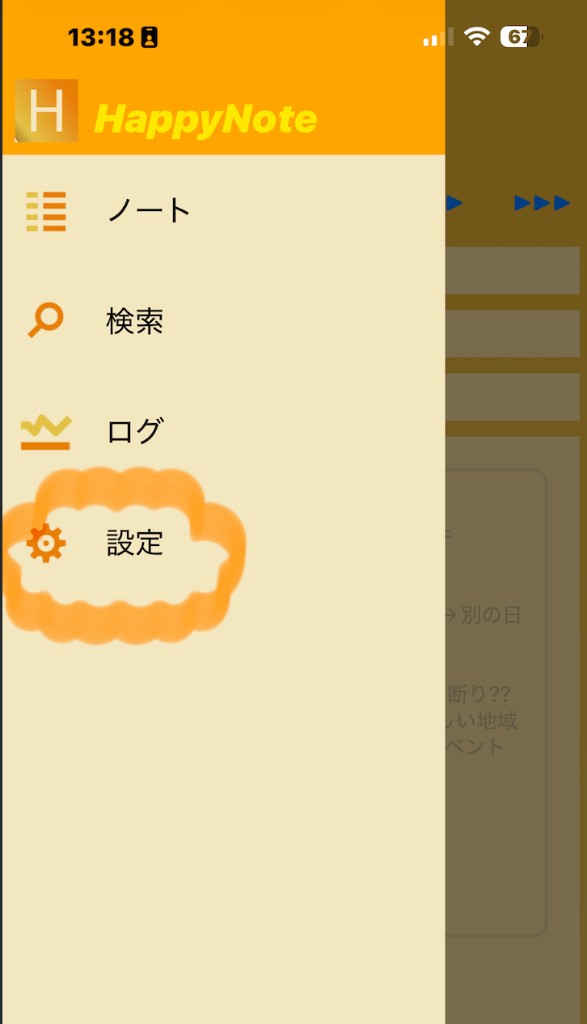
Menu → Settings (設定) - Step 3 Scroll down the Settings screen to the Export section.
-
Step 4 Tap Backup (export data file).
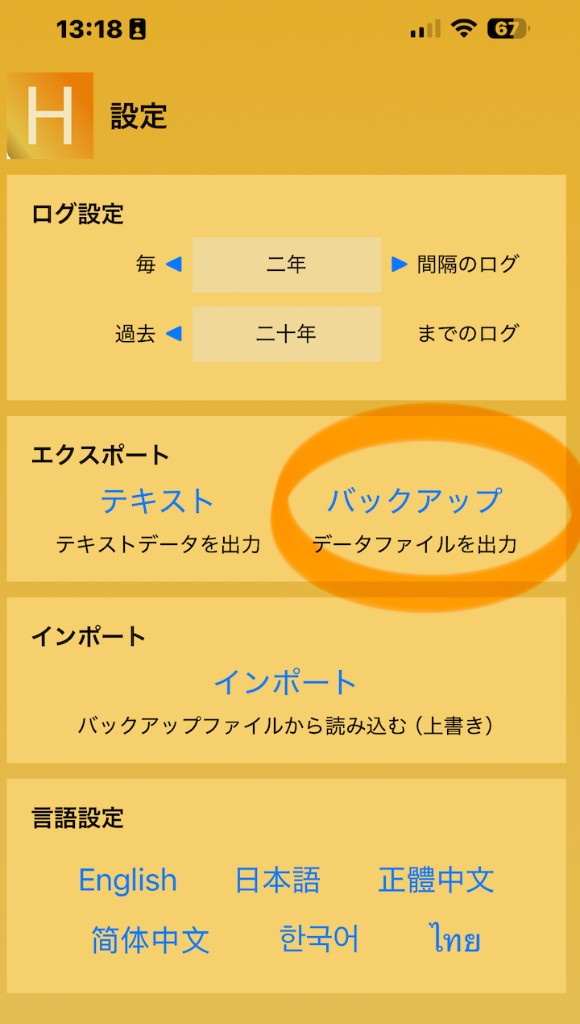
Export → Backup (バックアップ) - Step 5 Choose where to save the file, then send it to us by email or cloud storage.
※ Before sending, delete anything you want to keep private inside the app, then create a fresh backup.